How to Install Our Earning App on Android
Follow these simple steps to download and install PAK Arcade on your Android phone. The entire process takes less than 2 minutes.
Download APK Now — FreeVersion 2.1.0 · 46.6 MB · Android 8.0+
4 Simple Steps to Install PAK Arcade
-
01
Download the APK
Tap the 'Download APK' button on this page. Your Android browser will start downloading the PAK Arcade APK file. The file is approximately 46.6 MB and will save to your Downloads folder.
Tip: Make sure you have a stable internet connection — Wi-Fi or 4G works perfectly.
-
02
Allow Unknown Sources
Since this APK is downloaded from outside the Play Store, you need to allow installation from unknown sources. Go to Settings > Security (or Privacy) > Enable 'Install Unknown Apps' for your browser or file manager.
Tip: On newer Android versions, you will be prompted automatically when you tap the APK file.
-
03
Install the App
Open your Downloads folder and tap the APK file. A prompt will appear asking you to confirm installation. Tap 'Install' and wait a few seconds — it completes quickly on any device.
Tip: The installation usually completes in under 10 seconds.
-
04
Register Your Phone Number & Claim Bonus
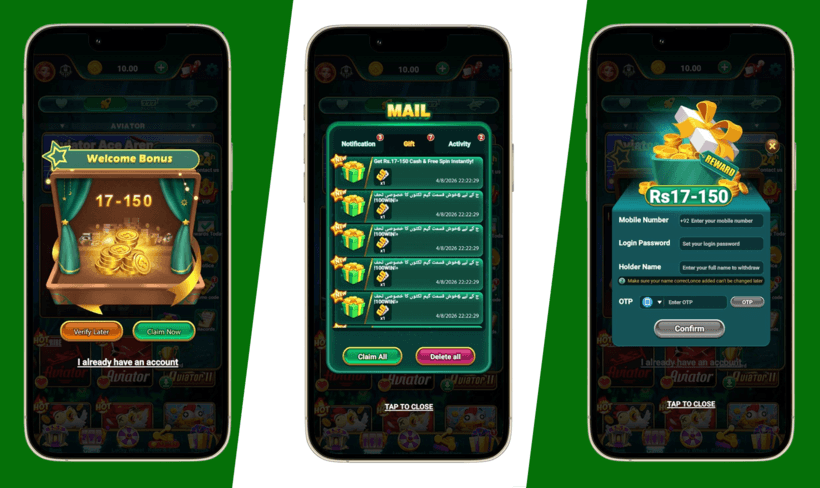
Open PAK Arcade, tap Register, and enter your Pakistani mobile number. Verify the OTP to bind your phone to your account. Once bound, your Registration Bonus is credited instantly — no conditions, no waiting. All 300+ games and daily bonus features unlock immediately after binding.
Tip: Phone binding takes under 30 seconds. After binding you also unlock the Daily Wheel, promo codes, VIP system, and all invite rewards.
Device Requirements
Make sure your Android device meets these requirements before downloading.
Common Installation Questions
Having trouble? Here are quick answers to the most common issues.
My phone says 'Install blocked' — what do I do?
This is normal for APK files downloaded outside the Play Store. Go to Settings > Security > Unknown Sources (or 'Install Unknown Apps') and enable it for your browser or file manager app.
The APK download is not starting — why?
Check your internet connection and try again. If the download still doesn't start, try using a different browser on your Android device.
How much space does the mobile earning app need?
The APK itself is 46.6 MB. After installation, it uses approximately 70 MB of storage. Make sure you have at least 100 MB free to be safe.
Can I install this on a tablet?
Yes. PAK Arcade works on any Android device — smartphones and tablets — running Android 8.0 or higher.
Is it safe to install an APK from outside the Play Store?
Our APK is safe and verified. However, always download from this official website only. Do not install APKs from unofficial sources.
Ready to Install PAK Arcade?
Tap the button below to download the free APK. Setup takes under 2 minutes on any Android phone.
Download Free APKVersion 2.1.0 · 46.6 MB · Android 8.0+ · 100% Free